Table of contents
Table of contents
- The 11 best NinjaOne alternatives for IT teams
- 1. Atera
- Atera Vs. NinjaOne: Key differences
- 2. Kaseya VSA
- 3. Pulseway
- 4. N-sight RMM
- 5. Action1
- 6. Domotz
- 7. LogMeIn Resolve
- 8. ConnectWise Automate
- 9. Jira Service Management
- 10. ManageEngine Endpoint Central
- 11. Syncro
- Final thoughts
- What is NinjaOne?
- Why look for a NinjaOne alternative?
- What are NinjaOne’s specializations?
- The pros and cons of NinjaOne
Generate summary with AI

One of the most important decisions IT organizations can make is choosing the right IT management software. In the end, the right platform can save you money and free up your time for strategic projects or further complicate things and increase your bottom line.
NinjaOne is a known platform for IT teams, but many are looking for an alternative because they find it lacking for one reason or another.
In this article, we’ll take a closer on industry leaders. This time, we’ll look at NinjaOne and its limitations and specializations, and we’ll list the 11 best NinjaOne alternatives for 2026 – from our research and findings.
The 11 best NinjaOne alternatives are:
The 11 best NinjaOne alternatives for IT teams
Let’s now move to the main topic of our article, the best NinjaOne alternatives review.
1. Atera

Atera Vs. NinjaOne: Key differences
1. Key features: Both Atera and NinjaOne offer remote monitoring, patch management, IT ticketing, and robust integrations with 3rd-party software. Of the two, only Atera offers a true all-in-one platform for enterprises with scalable pricing, built-in RMM and PSA, accompanied by a true Agentic AI technology.
2. Agentic AI: Unlike traditional IT management tools that rely on obsolete technology, Atera enables IT to run autonomously through its AI agents. Atera’s AI agents take on manual, repetitive tasks off techs’ tables, eliminating 40% of the IT workload and completely transforming how your organization can manage its IT environment.
Since NinjaOne doesn’t come with any practical AI features, Atera’s AI agents tend to impress users who migrate to us from NinjaOne. One Reddit user said it best:

Atera’s Robin is the first line of support for end-users, completing tasks like resolving technical issues or creating step-by-step guides, all without any technician involvement. If an issue is too complex, Atera’s Copilot comes in handy… It assists technicians in generating the right scripts for fixing issues, summarizing and responding to tickets automatically, generating remote session summaries, and more.
Together, Atera’s AI agents help enterprises eliminate 40% of their IT workloads automatically, allowing technicians to focus on more strategic tasks.
3. Pricing structure: Atera’s pricing is based on pay-per-technician, whereas NinjaOne uses a pay-per-endpoint model pricing. Adding new endpoints with NinjaOne increases the price quickly, whereas Atera enables you to add as many endpoints as you need without increasing the price. This means there are no surprise costs when you’re scaling.
Atera and NinjaOne are leading IT management solutions, each offering robust features for IT organizations. For a detailed comparison of their capabilities, user reviews, and performance metrics, check out the comprehensive G2 analysis here.

1. User interface and usability
No matter your IT organization’s size, Atera is known for having an easy onboarding process with 24/7 live agent support. While most NinjaOne customers report ease of use, the lack of strong customer support can make it difficult to use the platform if you face problems.
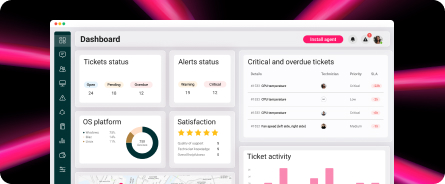
From Atera’s dashboard, you immediately get an overview of what’s happening in your IT environment.

Atera users, like Spirit UK, continuously praise the interface, which makes navigation simple and straightforward. New users can get up and running in only a few minutes, and once they have, the admin dashboard is intuitive and easy to navigate.
Spirit UK IT director, Pal Sehmi, continued by saying:
- “The dashboard’s immediate overview of customer and device status has the biggest impact. We can see what’s critical? What are the important tickets? What’s going on at a glance?”
While many NinjaOne customers find the software easy to use, users have complained that NinjaOne’s dashboards can be difficult to navigate at first and require additional training.
2. Customer support and community
No matter how robust the system is or how experienced your IT team may be, there may come a point when customer support is needed. Both Atera and NinjaOne have active IT communities where customers can share scripts, troubleshoot issues, and discuss common problems.
Where Atera really makes its mark in its extensive library of resources, tutorials, and knowledge bases. Getting started with Atera is easy, thanks to our active community of users, 24/7 live agent support, and a variety of digital resources for self-learning and assistance.
3. Pricing plans and value for money
The main advantage of Atera’s pricing is that it’s based on a pay-per-technician model. This means you can add as many endpoints to your system as you want without having your prices go up. For larger organizations managing thousands of endpoints, this can be a real game-changer.
Another factor is transparent pricing, which we’re big believers in at Atera. While enterprises can request a custom quotation for more tailored offerings, the standard pricing plans for IT departments range from $149 to $219 per month.
Below are Atera’s pricing plans laid out.
The pricing plans for IT departments:
- Professional: $149 per month, per technician
- Expert: $189 per month, per technician
- Master: $219 per month, per technician
- Enterprise: Custom quotation, contact sales to get the pricing
- Pro: $129 per month, per technician
- Growth: $179 per month, per technician
- Power: $209 per month, per technician
- Superpower (Enterprise): Custom quotation, contact sales to get the pricing
4. Customer reviews
Atera’s G2 Rating: 4.6 out of 5 stars (830+ reviews)
What Atera users are saying on G2:
- “Atera’s ease of use and AI have transformed our IT workflow. Atera Copilot is a game-changer and helps us resolve issues 70% faster,” a G2 user says.
- “I use Atera for a health care environment, and it’s incredibly easy to set up automation policies and create scripts for rolling out software,” a G2 user says.
Capterra Rating: 4.6 out of 5 stars (430+ reviews)
What Atera users are saying on Capterra:
- “I don’t think I’d be able to do all the things I need to do in my job without Atera. It’s an intuitive, powerful system,” a Capterra user says.
- “I like that through Atera’s RMM, we can monitor and manage computer systems remotely. This is helpful for keeping our infrastructure in good working order,” a Capterra user says.
2. Kaseya VSA

Kaseya VSA streamlines the management of different IT operations, such as handling complaints, tickets, audits, monitoring performance, and reporting. While some NinjaOne customers have reported the platform as hard to navigate at first, ease of use is one of Kasey VSA’s strong points.
Kasey VSA uses a similar pricing structure to NinjaOne, and you have to request a demo to get the pricing from them. The pricing is based on pay-per-endpoint/device, meaning you get charged for the number of devices you manage.
G2 Rating: 4.0 out of 5.0 (300+ reviews)
Capterra Rating: 4.1 out of 5.0 (200+ reviews)
Kaseya VSA Pricing:
- Kaseya doesn’t make its pricing plans public. To get it, you need to contact their sales team.
3. Pulseway

Pulseway enables MSPs and IT teams to monitor and control their IT processes remotely. Upon onboarding, you can discover your devices automatically, monitor them in real-time, receive alerts for potential issues, and take remediation actions to solve issues.
One advantage of Pulseway over NinjaOne is the available mobile app. With a 4.4 out of 5-star rating and over 5,000 reviews on Google Play alone, it is known to be an effective solution for IT teams seeking to do remote management via mobile devices.
G2 Rating: 4.6 out of 5.0 (110+ reviews)
Capterra Rating: 4.7 out of 5.0 (305+ reviews)
Pulseway Pricing:
- Pulseway has a pricing calculator on its website that you can use to calculate how much the pricing is for your situation
4. N-sight RMM

N-able N-sight combines remote monitoring and management, ticketing, and billing functions into a single integrated platform. The software is particularly well known for its patch management capabilities, which lets users keep their devices up to date. The patching tool is also the primary advantage of N-sight over NinjaOne.
Some N-sight customers have reported the interface being outdated. This is a downside compared to NinjaOne, which is mostly known for having a modern interface.
G2 Rating: 4.3 out of 5.0 (300+ reviews)
Capterra Rating: 4.3 out of 5.0 (150+ reviews)
N-sight Pricing:
- N-sight doesn’t make the pricing public, but it’s based on the number of endpoints you manage. You need to “Contact a specialist” from their website to receive the pricing.
5. Action1

Action1 is designed entirely for patch management. With it, you can create custom patch schedules and keep your Windows, macOS, Linux, and third-party applications up-to-date with the latest security updates.
Since it is entirely focused on patch management, it does miss some essential features like RMM or PSA, which are important for most IT teams. For these, it needs to be integrated with third-party tools.
G2 Rating: 4.9 out of 5.0 (500+ reviews)
Capterra Rating: 4.9 out of 5.0 (200+ reviews)
Action1 Pricing:
- Custom quotation: To get pricing from Action1, you need to request a quote from their website.
6. Domotz

Domotz is designed for IT departments and MSPs who need remote network monitoring and management tools. It may not be the most robust all-in-one IT management platform, but it does have good remote device monitoring features. It also helps you to detect any faults or devices dropping offline.
Since the platform focuses mostly on device monitoring and fault detection, it’s a good NinjaOne alternative for that purpose. Still, it lacks the capability for teams looking for an all-in-one IT management solution.
G2 Rating: 4.9 out of 5.0 (90+ reviews)
Capterra Rating: 4.9 out of 5.0 (110+ reviews)
Domotz Pricing:
- Domotz Free: Free for managing one device
- Domotz Pro: $1.50 per managed device, per month
7. LogMeIn Resolve

Specifically aimed at SMBs, LogMeIn Resolve is an IT management and support platform that helps to automate the remote management of devices. IT teams that are new to RMM software will probably find LogMeIn Resolve easier to learn than NinjaOne. This is because it has more basic features, which can also be a downside, depending on what you’re looking for.
LogMeIn Resolve may be a suitable option for small businesses looking for simplicity and affordability. Still, it may not be enough for those who want a more robust ticketing system, reporting, and patch management.
G2 rating: 4.4 out of 5.0 (430+ reviews)
Capterra rating: 4.4 out of 5.0 (200+ reviews)
LogMeIn Resolve Pricing:
- Remote Access and Support: $44/month for 100 devices, billed annually
- Standard Endpoint Management: $57/month for 25 devices, billed annually
- Premium Endpoint Management: $63/month for 25 devices, billed annually
8. ConnectWise Automate

ConnectWise Automate is an RMM platform that helps you discover and manage multiple devices, monitor IT issues, and automate responses to them. While NinjaOne doesn’t have a built-in PSA system, ConnectWise Automate has it.
ConnectWise Automate might offer more features than NinjaOne, but it’s also harder to navigate around, making it not an ideal alternative for beginner users.
G2 Rating: 4.1 out of 5.0 (130+ reviews)
Capterra Rating: 4.2 out of 5.0 (135+ reviews)
ConnectWise Automate Pricing:
- The pricing is pay-per-device. To get the pricing for your organization, you need to request a quotation from ConnectWise’s team
9. Jira Service Management

Jira Service Management is an IT service management solution by Atlassian that enables IT teams to resolve any IT-related incidents and requests more quickly. IT teams without advanced workflows who are seeking a general IT service management solution may find it a suitable alternative.
Another benefit is that Jira Service Management integrates well with other Atlassian products, such as Jira Software and Confluence. If you have a more advanced workflow, you may find the level of customization to be too low.
G2 rating: 4.2 out of 5.0 (780+ reviews)
Capterra rating: 4.5 out of 5.0 (700+ reviews)
Jira Service Management pricing:
- Free: Free for up to 3 agents
- Standard: $23.80 per month, per agent
- Premium: $53.30 per month, per agent
- Enterprise: Pricing based on custom quotation. Visit their website to learn more.
10. ManageEngine Endpoint Central

ManageEngine Endpoint Central lets you remotely manage desktops, laptops, servers, mobile devices, and tablets. IT teams can use it to manage multiple endpoints, perform remote troubleshooting, and monitor suspicious activities, all from a single interface.
For remote management, ManageEngine Endpoint Central is known to be a good NinjaOne alternative. However, if customer support is a priority for you, ManageEngine Endpoint Central may not be a suitable alternative because many G2 customers have complained about the support team being incompetent.
G2 Rating: 4.4 out of 5.0 (880+ reviews)
Capterra Rating: 4.6 out of 5.0 (970+ reviews)
ManageEngine Endpoint Central Pricing:
- Professional: Starts at $104 for 50 endpoints
- Enterprise: Starts at $124 for 50 endpoints
- UEM: Starts at $139 for 50 endpoints
- Security: Starts at $205 for 50 endpoints
11. Syncro

Syncro is an IT management solution for IT departments and MSPs. Its key features include RMM, PSA, remote access, reporting and analytics, and patch management. It’s especially known among small businesses.
To extend the functionality, Syncro offers third-party integrations with tools like Domotz, Quickbooks, Zapier, and Xero.
G2 Rating: 4.5 out of 5.0 (300+ reviews)
Capterra Rating: 4.6 out of 5.0 (75+ reviews)
Syncro Pricing:
- Core Plan: $139 per month, per user
- Team Plan: $189 per month, per user
Final thoughts
Now that we have discussed the best NinjaOne alternatives, we hope you have a clearer understanding of what alternative might work best for you. In the end, it comes down to what you’re looking for in your IT management software.
If you want the industry’s first Agentic AI IT management tool, Atera is arguably the best (and only) solution. Atera users like Leeds United are already using our AI agents and are achieving impressive results, such as a 35% reduction in tickets.
If you want to understand how Atera can help your IT department be more efficient using its Agentic AI technology, get in touch with our sales team today. Or, you can sign up for Atera’s 30-day free trial. No credit card is required!
What is NinjaOne?

NinjaOne provides IT teams with a solution for monitoring and managing endpoints through its IT management software. Its key features are endpoint management, remote control, MDM, an IT ticketing system, and backups.
According to its website, NinjaOne was founded in 2013 and is used by IT teams around the globe.
Why look for a NinjaOne alternative?
As part of writing this article, we wanted to see the actual reasons users are looking for NinjaOne alternatives.
G2, Capterra, Reddit, and other review platforms revealed that NinjaOne’s main limitations are missing features, lack of responsive support, pricing, and lack of AI advancements.
Let’s look into each of these in more detail.
1. Missing IT management features
This was a key concern for NinjaOne users. According to G2, NinjaOne’s main con for customers is the missing features:

Users point out limitations in patch management, a lack of automation templates, weak MDM capabilities, weak reporting, and insufficient hardware insights.
For example, this is what one G2 user said:

Another NinjaOne user simply said, “Reporting could be stronger, especially end-user-facing reports that convey the value of what we’re providing to customers.”

Plus, NinjaOne lacks a fully-fledged PSA, which is a dealbreaker for MSPs who want to manage all their customer relationships from one platform.
2. NinjaOne’s support staff may not be responsive
NinjaOne offers email and phone support, as well as a knowledge base for self-help. However, users have shared frustrations with it, stating that the support is unresponsive and lacks technical expertise.
One Reddit user had billing issues and was concerned as he couldn’t get a response from NinjaOne’s support. This is what the user said:

Some users on Reddit have also shared frustrations with the support team’s technical expertise.
For example, one Reddit user said, “If you seek any support outside of that, I usually just get an answer that is either plain wrong or something I have already managed to Google myself.”

With a few competitors offering 24/7 live chat technical support, this is a real drawback for NinjaOne.
3. The pricing structure doesn’t support scaling
NinjaOne’s pricing structure is based on the pay-per-endpoint model, which means you pay for the amount of endpoints you manage. For organizations with 1000+ endpoints, this can get expensive, quickly.

NinjaOne review via G2
Another point users make is that many of the key features aren’t available with the base pricing. One G2 user said ticketing isn’t available:

Another feature NinjaOne charges extra for is its remote access tool. This is what one user mentioned about it:

Several NinjaOne alternatives offer remote access and ticketing as part of the base plans, so this is another disadvantage.
4. Limited AI advancements
With Agentic AI advancing quickly within the IT management space, users are expecting to see new innovations in IT management tools, including NinjaOne. Agentic AI can transform the way organizations manage their IT environments.
Unfortunately, NinjaOne has made limited progress in its AI features. As of July 2025, NinjaOne has only announced the use of AI within its patch management tool. For its users, there aren’t any concrete AI tools they can use.
This arguably raises questions of whether NinjaOne can be a future-proof fit for organizations, especially since few alternatives have already incorporated Agentic AI into their entire platforms.
What are NinjaOne’s specializations?
NinjaOne does have its specializations too. Two advantages customers report on are remote management and patch management capabilities.
This is what users said:
1. Remote management capabilities
As an add-on to NinjaOne’s base plans, users can select NinjaOne’s remote access tool. It lets users remotely access devices for troubleshooting, which one NinjaOne user on G2 found helpful.
2. Available integrations
While NinjaOne doesn’t offer PSA capabilities built-in, it does integrate with different PSA software, as well as with cybersecurity, antivirus, accounting, and automation software. One user simply said, “The wide range of available integrations further enhances our workflows.”
The pros and cons of NinjaOne
To summarize the pros and cons of NinjaOne, take a look at the following bullet points.
The pros:
- As an add-on, you can get access to a remote access tool for troubleshooting device issues
- The available integrations help you extend the functionality easily
The cons, according to customer reviews:
- Some features, such as reporting, automation templates, and hardware data, lack depth
- Customer support staff may not be knowledgeable enough about the software, and waiting times can be long
- NinjaOne’s pay-per-endpoint model can get expensive for large organizations and those looking to scale
- As of 2025, NinjaOne has made minimal AI advancements within its product
Frequently Asked Questions
Related Articles

The 7 Best Patch My PC Alternatives in 2026
Discover the best Patch My PC alternatives. Compare them across pricing, features, AI, and user reviews. See which option works best for your organization.
Read now
The 7 Best Rev.io Alternatives Your IT Team Can Use In 2026
Learn about the best Rev.io alternatives that modern IT teams use. See how they compare across features, pricing, user reviews, and AI.
Read now
Top 7 Aisera Alternatives for 2026
Learn about the best Aisera alternatives. See how they differ across features, Agentic AI, pricing, and user reviews.
Read now
7 Best Autotask PSA Alternatives for 2026
Find out the best Datto Autotask PSA alternatives. See how they compare across features, pricing, user reviews, and Agentic AI.
Read nowEndless IT possibilities
Boost your productivity with Atera’s intuitive, centralized all-in-one platform