Generate summary with AI

Looking for the best ITarian alternatives? ITarian is used by many organizations, but reviewers say it lacks advanced IT management features, its support is lacking, and users have had billing issues. Plus, no Agentic AI improvements have been made.
If you’re an ITarian customer and have faced these limitations or you’re simply exploring alternatives, our article can help.
We’ve reviewed the best ITarian alternatives for 2026. For each alternative, we’ll go through the key features, pricing, and user reviews, so you can make an informed decision for your organization.
The best ITarian alternatives are:
The 9 best ITarian alternatives for 2026
Let’s now review the best ITarian alternatives.
1. Atera

Atera vs. ITarian: Key differences
1. IT management features: Atera is an Agentic AI, IT management tool that integrates all key IT functions into one, such as our RMM software, patch management, scripting, ticketing, and remote access, all powered by our AI agents.
A common complaint of ITarian was the lack of advanced IT management features. At Atera, our features are highly customizable, and we constantly develop our platform to meet the needs of both enterprises and startups.
2. Agentic AI: Atera is the first (and only) IT management tool with Agentic AI technology at the core of its product. With Atera’s two AI agents, you can eliminate up to 40% of your IT workload instantly and give technicians the time and freedom to focus on strategic tasks that actually move the needle.
Atera was selected on Capterra’s Shortlist of the best AI tools. G2 also selected Atera as the #1 best AIOps tool for 2026.
3. Customer support: Unlike ITarian, Atera offers 24/7 live chat and email support, meaning you have access to help at all times.
4. Pricing: ITarian’s RMM pricing is based on pay-per-device, meaning you get charged based on the number of endpoints you manage. With Atera’s per-technician pricing, you can manage unlimited endpoints/devices for a fixed monthly cost.
1. Features and capabilities
Atera’s key standout feature over ITarian is its AI agents, Atera’s Robin and AI Copilot.
Robin handles your first-tier support by interacting with end-users on the channels they already live in: Slack, email, Teams, or your Customer Portal.
It doesn’t just respond to user queries; it’s capable of solving real-world IT issues fully autonomously.

For technicians, AI Copilot comes in handy. It’s your go-to IT companion for running health checks, executing actions, summarizing tickets, and much more.
In comparison, ITarian offers AI technology for its MSP users, capable of answering questions users have. However, it isn’t capable of resolving issues autonomously.
2. Pricing and value for money
Not only does Atera’s pricing allow you to manage unlimited devices, but it’s fully transparent. Unlike most RMM pricing plans, all of our standard pricing plans are publicly listed on our website, making it easy to compare with ITarian and other alternatives.

Atera pricing plans for IT departments:
- Professional: $149 per month, per technician
- Expert: $169 per month, per technician
- Master: $219 per month, per technician
- Enterprise: Custom quotation; contact sales to get pricing
- Pro: $129 per month, per technician
- Growth: $179 per month, per technician
- Power: $209 per month, per technician
- Superpower (Enterprise): Custom quotation. Contact sales for pricing.
3. Customer reviews and ratings
Atera’s G2 Rating: 4.6 out of 5 stars (890+ reviews)
ITarian G2 Rating: 4.5 out of 5 stars (10+ reviews)
What Atera users are saying on G2:
- “Atera is an outstanding and intuitive RMM solution that we use daily to deliver efficient and reliable customer support,” a G2 user says.
- “I really like how everything is in one place — remote access, patching, alerts, and ticketing. It’s simple to understand, even if you’re not too technical,” a G2 user says.
Atera’s Capterra Rating: 4.6 out of 5 stars (430+ reviews)
ITarian Capterra Rating: 3.8 out of 5 stars (20+ reviews)
What Atera users are saying on Capterra:
- “Atera Copilot AI function is amazing! It can help you to solve an issue and also help create a knowledge base for the issue to reference in future problems, saving so much time,” a Capterra user says.
- “We use Atera as an all-in-one RMM platform, which is designed to help managed service providers and help in streamlining IT support/maintenance,” a Capterra user says.
2. ManageEngine OpManager

ManageEngine OpManager is a network monitoring software that makes it easy to manage your switches, routers, servers, printers, and other network devices. It correlates raw network events, filters unwanted ones, and alerts you when potential issues arise.
Unlike Atera’s RMM, OpManager is priced pay-per-endpoint, which can get expensive for organizations with endpoint-heavy IT environments.
G2 Rating: 4.4 out of 5.0 stars (100+ reviews)
Capterra Rating: 4.6 out of 5.0 stars (100+ reviews)
ManageEngine OpManager Pricing:
- Custom quotation. Contact ManageEngine’s sales team for pricing options.
3. Paessler PRTG
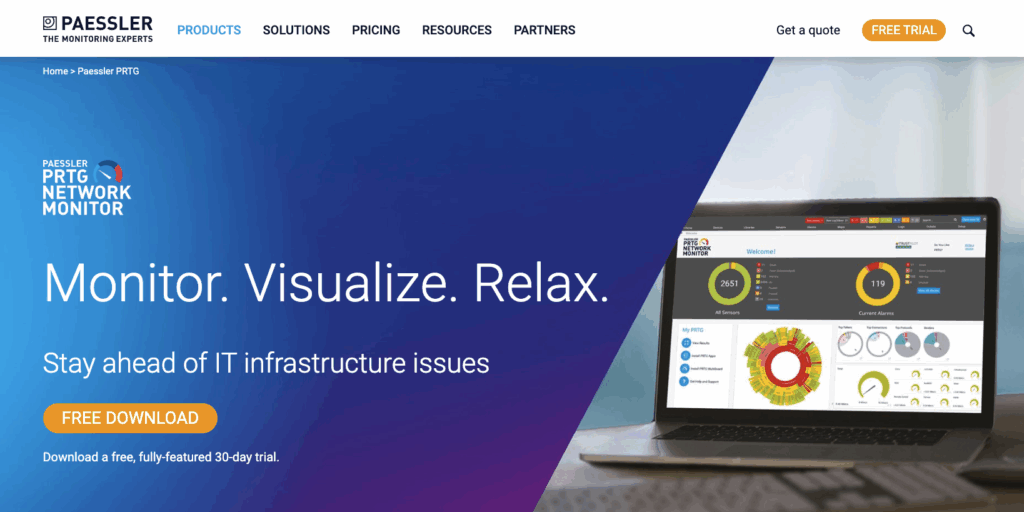
Paessler PRTG is a tool for infrastructure monitoring. It includes features like automatic device discovery, network topology maps, and alerting when it detects problems or unusual activity.
Unlike Paessler alternatives, like Atera, PRTG doesn’t have a built-in ticketing or patch management system. With Atera, you can perform similar tasks to PRTG, but also deploy patches using Atera’s patch management tool.
G2 Rating: 4.6 out of 5.0 stars (100+ reviews)
Capterra Rating: 4.6 out of 5.0 stars (250+ reviews)
Paessler PRTG Pricing:
- PRTG 500: $137/month for about 50 devices
- RTG 1000: $242/month for about 100 devices
- PRTG 2500: $508/month for about 250 devices
- PRTG 5000: $908/month for about 500 devices
- PRTG 10000: $1,225/month for about 1,000 devices
4. N-able N-central

N-able N-central is an endpoint management tool that lets you manage and secure Windows, Mac, and Linux devices. You can deploy patches to your OS and third-party apps, remotely access devices, manage hardware and software licenses, and more.
N-central shares similar features to Atera’s all-in-one platform, but doesn’t include a built-in ticketing system or Agentic AI. With Atera’s ticketing system, you can easily manage end-user support requests, all from a single platform.
G2 Rating: 4.4 out of 5.0 stars (500+ reviews)
Capterra Rating: 4.1 out of 5.0 stars (150+ reviews)
N-central Pricing:
- N-able doesn’t make the pricing public, but it’s based on the number of endpoints you manage. You need to “Contact a specialist” from their website to receive the pricing.
5. Pulseway

Pulseway is an IT management solution used by IT departments and MSPs. It allows them to monitor and troubleshoot workstations, servers, networks, and mobile devices.
Similar to Atera, Pulseway is an all-in-one IT management solution. The main difference is, Atera’s pricing is pay-per-technician, while Pulseway charges based on the number of endpoints you manage.
G2 Rating: 4.6 out of 5.0 (110+ reviews)
Capterra Rating: 4.7 out of 5.0 (305+ reviews)
Pulseway Pricing:
- Pulseway has a pricing calculator on its website that you can use to calculate how much the pricing is for your situation
6. Auvik

Auvik is a broader network management software that gives IT teams visibility into their IT infrastructure. You can map your network to see every device, detect and resolve issues, and get alerted to potential issues instantly.
Auvik is entirely focused on network monitoring, arguably at the cost of other IT management functions. Unlike Atera, it doesn’t include patch management, ticketing, or Agentic AI capabilities.
G2 Rating: 4.5 out of 5.0 stars (300+ reviews)
Capterra Rating: 4.6 out of 5.0 stars (70+ reviews)
Auvik Pricing:
- Custom quotation. Contact Auvik’s sales team via their website for exact pricing.
7. Domotz

Like Auvik, Domotz is a network monitoring software for IT teams. It lets you automatically discover and identify new devices, monitor device health, apply custom scripts, and access devices remotely if needed.
The features are broad, but no Agentic AI capabilities are available for doing tasks autonomously, unlike with Atera.
G2 Rating: 4.8 out of 5.0 (80+ reviews)
Capterra Rating: 4.9 out of 5.0 (100+ reviews)
Domotz Pricing:
- Enterprise: Starting at $1,000 per month
- Pro: $35 per month per site
8. Kaseya VSA

Kaseya VSA is one of the leading RMM software solutions, with capabilities like automated patch management, auto-remediation, asset management, remote access, and monitoring and alerting.
Like most RMM pricing plans, Kaseya VSA is priced pay-per-technician. For most enterprises, pay-per-technician pricing, such as that offered by Atera, is often a better choice.
G2 Rating: 4.0 out of 5.0 (300+ reviews)
Capterra Rating: 4.1 out of 5.0 (200+ reviews)
Kaseya VSA Pricing:
9. Naverisk

Naverisk competes in the all-in-one IT management space with its platform. It aims to combine RMM, service desk, and PSA capabilities into one solution. It’s commonly used by MSPs to manage clients’ IT environments.
According to G2 users, Naverisk’s main drawback is its ticketing system, which could be improved. Unlike Naverisk, Atera’s ticketing system allows you to summarize and respond to tickets fully autonomously, thanks to our AI agents.
G2 Rating: 4.7 out of 5.0 stars (65+ reviews)
Capterra Rating: 4.8 out of 5.0 stars (95+ reviews)
Naverisk Pricing:
- Based on a custom quote. To get the pricing, fill in a form on Naverisk’s website, and their team will contact you.
Move from automated to fully autonomous IT: Only with Atera
Of all the ITarian alternatives listed above, Atera is the only platform with true Agentic AI technology at its core.
Atera’s AI agents handle manual and repetitive tasks fully autonomously, just like a technician would. The result? Up to 40% of your IT workload is instantly eliminated, and employee satisfaction is increased, thanks to Autopilot providing 24/7 on-demand support for end-users.
We’re not just building another AI chatbot; our goal is to transform how IT operations are managed. Instead of shying away from Agentic AI, bring your organization to the modern age with Atera.
To future-proof your IT, an easy step you can take is to sign up for Atera’s 30-day free trial.
What is ITarian?

ITarian is an IT management tool used by IT teams and MSPs. It aims to combine all key IT functions into one platform, including a ticketing system, RMM software, patch management, MDM, remote desktop, and endpoint security.
Why look for an ITarian alternative?
After looking at tons of ITarian reviews, it became quickly clear why many look for an ITarian alternative.
These are the main limitations users report on ITarian:
1. Lack of key IT management features
ITarian users say the platform lacks features found in other IT management tools.
For example, this user said patch scheduling isn’t available, although it was advertised:

Another user criticized ITarian’s reports and said:

The truth is, both patch scheduling and advanced reports should be a key part of any best RMM software.
2. Customer support is lacking
Lack of support was another common complaint for ITarian.
First of all, live chat support isn’t available, which some ITarian users complained about. Secondly, users say the support is slow and isn’t always helpful in resolving issues:

With 24/7 live chat support becoming more and more standard in IT management platforms, this is another notable drawback.
3. Billing issues
This was a big one. One ITarian user said their entire account got frozen due to a billing error on ITarian’s end.
And as the reviewer said, this can have serious consequences on client relationships:
“Without any proper verification or due diligence, they froze our account and—unbelievably—broadcasted a message across hundreds of our managed endpoints, potentially damaging our credibility with clients and creating unnecessary alarm across the board.”

As you look for an ITarian alternative, make sure to prioritize solutions proven track record of reliability, transparent pricing, and 24/7 support if something goes wrong.
What are ITarian’s strengths?
Let’s also look at a few ITarians’ strengths, aka what they’re good at:
1. Scripting system
ITarian has a scripting system built in, which you can use on computers to remediate issues and perform other actions. Customers on Capterra appreciated this.
While users appreciate this, scripting is a standard feature in today’s IT management software. Plus, ITarian doesn’t expand to AI-powered scripting, unlike Atera’s scripting system.
2. Reliable remote connection
In addition to scripting, you can remotely connect to clients’ devices and give them support, which users appreciated.
Unlike Atera’s remote access software, ITarian doesn’t offer stand-out features, like automatic remote session summaries.
ITarian pros and cons: Takeaways
To conclude the two previous sections, here are the pros and cons of ITarian:
The pros, according to users:
- The scripting tool helps remediate issues
- Remote troubleshooting is available to give remote support to clients
The cons, according to users:
- Users report a lack of key IT management features, like patch scheduling and advanced reporting
- Customer support is lacking, and live chat isn’t available
- Some users have had issues with billing
Related Articles

The 7 Best Patch My PC Alternatives in 2026
Discover the best Patch My PC alternatives. Compare them across pricing, features, AI, and user reviews. See which option works best for your organization.
Read now
The 7 Best Rev.io Alternatives Your IT Team Can Use In 2026
Learn about the best Rev.io alternatives that modern IT teams use. See how they compare across features, pricing, user reviews, and AI.
Read now
Top 7 Aisera Alternatives for 2026
Learn about the best Aisera alternatives. See how they differ across features, Agentic AI, pricing, and user reviews.
Read now
7 Best Autotask PSA Alternatives for 2026
Find out the best Datto Autotask PSA alternatives. See how they compare across features, pricing, user reviews, and Agentic AI.
Read nowEndless IT possibilities
Boost your productivity with Atera’s intuitive, centralized all-in-one platform













