Table of contents
Generate summary with AI

When comparing the best IT management tools out there, Atera and Syncro are two that come up often. These two platforms have many similarities and differences, and in this article, we will take a closer look at what sets Atera and Syncro apart.
We’ve done in-depth research on your behalf and reviewed the features, AI innovations, pricing, and support of both Atera and Syncro. After reading this article, you’ll have a better clue which one of the two leading IT management platforms is the best RMM software for your specific needs. Let’s begin.
Atera vs. Syncro: An overview
Before going into more detail, we’ve created an overview table of Atera vs. Syncro:
| Atera Features | Syncro Features | ||
| – Autonomous IT tool with built-in RMM, remote access, network discovery, and documentation – Patch management for Windows, macOS, and Linux devices – Asset management to track the lifecycle of IT assets – Agentic AI (Includes Robin, AI Copilot, AI-powered troubleshooting, scripting, ticketing, and more) – PSA for MSPs to track contracts, billing, SLAs, and more | – RMM to remotely monitor Windows, macOS, and Linux devices – PSA to manage tickets, create contracts and invoices, track SLAs, and more – Microsoft 365 multi-tenant management – Ticketing automation to automatically categorize tickets – Patch management – Billing and invoicing | ||
| Customer support | Customer support | ||
| – 24/7 email and live chat support for all customers – An extensive knowledge base, IT community, and tutorials | – 24/5 email and phone support – Knowledge base articles – Community forum | ||
| Integrations | Integrations | ||
| – Integrations with 25+ cybersecurity, automation, backup, remote access, and network monitoring software – Access to 5,000+ apps through Zapier | – Integrations with cybersecurity, accounting & remote access software | ||
| Pricing | Pricing | ||
| – Transparent pay-per-technician pricing, starting from $129/month – 30-day free trial available | – Transparent pay-per-technician pricing – 14-day free trial available |
Using G2 to compare the user satisfaction, ease of use, quality of support, and the features, we can see that Atera beats Syncro in every category:

You can explore the full G2 comparison table here.
Let’s now move on to the in-depth part of our comparison article:
#1: Features and capabilities
Atera and Syncro share similar features and capabilities, such as RMM software, patch management, ticketing, and analytics.
While Syncro is mainly used by smaller MSPs, Atera caters to both enterprises and SMBs with its holistic features and advanced Agentic AI technology, which takes IT efficiency to the next level.
In addition to these, both Atera and Syncro offer various IT integrations, including with antivirus, remote access, automation, and accounting software. Some of the integrations that both platforms offer include Webroot, Bitdefender, Emsisoft, and Splashtop.

Both Atera and Syncro also have automation for making patch schedules, running scripts, and doing other maintenance tasks. But only Atera accompanies this with Agentic AI technology, capable of fully autonomously managing your IT environment.
#2: Agentic AI development
Agentic AI is changing the IT management landscape by handling manual and repetitive tasks autonomously.
It represents a paradigm shift in how IT operates, so it’s important to compare Atera and Syncro in this area. Both Atera and Syncro have AI features in their platforms, but at different capacities.
G2 recently selected Atera as the #1 leader in the best AIOps tools market, thanks to our innovative AI agents that are having a huge impact on organizations around the world.
Looking into G2’s graph of the best AIOps tools, we can clearly see Atera leading the pack:
To compare the two, Syncro’s AI tool is focused on its ticketing system. It helps you automatically assign sentiments to upcoming tickets, summarize tickets, and respond to them.
Atera’s AI Copilot is capable of doing the same within its ticketing system, and much more.
You can use Copilot to:
1. Troubleshoot devices: Run health checks, diagnose, suggest actions, and resolve issues on your macOS and Windows devices.
2. Generate scripts: Turn plain-text instructions into powerful scripts in seconds. No coding needed, whether you’re solving complex issues or automating maintenance tasks.
3. Get insights: Ask Copilot for insights about your IT environment. For example, you can ask it to “list all devices with low disk space” or “show all endpoints that haven’t been patched in the past 30 days.”
4. Create remote session summaries: Get clear summaries of your remote sessions automatically. See the actions performed on the end-user’s Windows device.
Our enterprise customers, like Leeds United, already use Copilot and have achieved a 25-35% reduction in tickets, freeing their technicians for more strategic tasks.

Copilot within Atera’s ticketing system
In addition to Copilot, Atera’s Robin is available for enterprises that deal with high ticket volumes and limited IT resources daily. It empowers end-users in self-solving IT issues, eliminating 40% of your IT workload automatically.
Whether it’s helping to install pre-approved software, creating step-by-step instructions, or resolving technical issues, Autopilot can handle it without any technician involvement-
Syncro doesn’t have a similar AI tool for automating end-user support, meaning its users need to manually.
#3: User interface and usability
User interface and usability are another important area, so let’s compare Atera and Syncro here.
At Atera, we’ve built our dashboards to be easy to use and navigate around. No matter your teams size, onboarding new technicians and end-users is easy and can be done in minutes, not days or weeks.
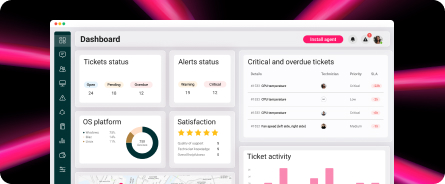
Here’s a look at Atera’s admin dashboard:

In comparison, here’s how Syncro’s admin dashboard looks like:

Syncro’s user interface (Source)
Both Atera and Syncro also extend access through mobile apps. This means technicians can take on tickets or any other IT task that comes up right from their phones. You can even remotely connect to devices, making it a highly convenient option for monitoring your network.
At Atera, we’ve received much praise for how easy our user interfaces are to use. In fact, users have rated “Ease of Use” as Atera’s main pro on G2:

G2 also has a section that compares two platforms’ ease of use, based on user reviews. For Atera and Syncro, we can see that Atera takes the lead:

Atera vs. Syncro G2’s ease of use comparison
For example, this is what one user shared on Atera’s ease of use: “Atera is very intuitive, so you can start without studying a big manual.”

#4: Performance and reliability
When it comes to performance and reliability, both Atera and Syncro receive positive customer reviews. Both platforms work hard to maintain consistent reliability in their systems to ensure smooth operation and business continuity.
Atera has a slight advantage over Syncro in this category, with a higher overall customer rating on G2.
Effective customer service is also a major component of high performance and reliability scores. At Atera, we are incredibly proud of our top-tier customer service offerings and quick response times.
One G2 user concluded Atera’s support by saying, “You have very good chat support who reacts within minutes.”
Syncro has recently received some backlash on its customer support, with users saying “it’s lacking.” For example, this user wrote he had to wait 36 hours before hearing anything back:

#5: Pricing and value for money
Atera and Syncro share a lot of similarities in their pricing plans. Unlike most RMM pricing plans, they’re based on pay-per-technician, which means you can manage unlimited endpoints for a fixed monthly cost.
Atera’s pricing plans range from $149 to $219/month for IT departments and from $129 to $209 for MSPs. We’re big advocates of transparent pricing, so you’ll always know what you’re paying for, with no hidden fees.
Syncro offers two pricing plan options: their Core Plan of $129 per month and Team Plan of $179 per month. The features of the two are similar, but the Team Plan has network discovery, ticket automations, and security baselines.

Atera’s IT department pricing plans
Many of Atera’s integrations, such as Splashtop, Homebrew, and Cholocatey, are part of its plans at no additional cost.
#6: Customer support and community
IT support is one of the most (if not the most) important parts of a good IT management platform. When issues arise, help should be available immediately. To solve this, Atera offers 24/7 live chat and email support for all users, while Syncro has 24/5 customer support available.
Syncro has, unfortunately, received backlash recently from it’s support, with users saying “getting a first response takes 36 hours.”
In addition, both Atera and Syncro offer self-help resources for their communities. These include tutorials, discussion boards, and script libraries to help you use the platform as effectively and efficiently as possible.
At Atera, we’re also incredibly proud of our active Atera Community. This community is a forum where countless Atera users interact, sharing tips, tricks, and helpful hints and asking for support when they need it. We hold regular events and webinars for our community to discuss how to make the most of our product and explore industry trends and insights.
We just held our most recent event, Ateraverse 2025, where we released our second autonomous IT agent, Robin, and industry leaders, like Zach Kass and Yacov Salomon, discussed the state of AI.

Ateraverse 2025
To help you improve end-user support, Atera Robin is available for our users. It empowers end-users to solve issues on their own by offering troubleshooting assistance and suggesting relevant knowledge base articles.
#7: Security and compliance
Atera and Syncro follow industry-standard security compliance with features like MFA (multi-factor authentication). Atera is also SOC II Type I certified!
Our Network Discovery tool allows for real-time tracking of devices on your network. It helps you easily maintain security across your network by helping you spot unauthorized devices, safely onboard new devices, and develop data backup and disaster recovery plans.
Additionally, we are constantly increasing our commitment to compliance and security. Our smart logging and reporting capabilities, as well as insights from our innovative AI agents, help you stay ahead of threats before they impact IT operations.
We also offer a range of security integrations for enterprises. These include with Acronis, Bitdefender, Cynet, Emsisoft, ESET, Ironscales, ThreatDown, Vicarius, and more. Find all of Atera’s integrations here.
Syncro has similar integrations, but only with four security platforms, including Bitdefender, Emsisoft, Huntless Labs, and Webroot.
#8: User feedback and reviews
With all the usability, features, and capabilities, it’s no surprise that both Atera and Syncro have earned positive user reviews.
On G2 alone, Atera has gained over 800+ reviews with an average rating of 4.6 out of 5.0 stars. Syncro has an average rating of 4.5 out of 5.0 stars with 300+ reviews.
One area Atera is highly praised for is its AI agents, with one G2 user saying, “Atera’s AI has transformed our IT workflow. The AI troubleshooting is a game-changer; it helps us resolve issues 70% faster.”
Another Capterra user said this about our AI capabilities:

One G2 user called Atera “the best RMM software” and said: The best part of Atera is its monitoring capabilities. It can monitor our devices, servers, end-user devices, and SNMP-based devices, and support Windows, Linux, and macOS-based operating systems.

In comparison, Syncro’s positive feedback mainly revolves around its ease of use and features, such as the RMM software and PSA.
One G2 user said this:

More often than not, Atera surpasses Syncro in its ability to meet the needs of an IT department and support its users when they need assistance. This is likely linked to our commitment to getting real feedback from our feedback to help us regularly update the platform.
Atera’s Agentic AI platform is the optimal choice for most IT departments
The core features of Atera and Syncro are similar, but Atera has one distinct advantage: its innovative Agentic AI technology.
Agentic AI represents a paradigm shift in how IT operates, and Atera is at the forefront of it with its autonomous IT tool.
Many IT teams already use our AI agents and are gaining significant benefits, such as:
- 40% of your IT workload being eliminated automatically
- Autopilot handling end-user support, dropping first response time to zero
- Cost reduced, thanks to our AI agents handling manual work
- Human technicians feeling more energized, as they can focus on strategic and fun initiatives that move the needle
If you want to try our AI agents yourself, you can do so with Atera’s 30-day free trial.
If you’re still deciding between Atera and Synchro, try the free trial of both systems so you can choose based on actual use. You can also get in touch with our sales team if you have any questions and want to find out if Atera is the right fit for your IT team.
If you still have questions, you can always contact our sales team to find out if Atera is the right fit for your IT team.
Frequently Asked Questions
Related Articles
Atera vs. Deel IT: A comparison for IT teams
Find out about the key differences of Atera vs. Deel IT. We’ve compared the two across features, Agentic AI, pricing, support, and interfaces.
Read now
Atera vs. Gorelo: A guide for IT decision makers
See Atera vs. Gorelo compared across key categories, like Agentic AI, features, pricing, user interface, and customer support.
Read now
Atera vs. Rev.io: Full look at the differences for IT teams
See Atera vs. Rev.io compared on pricing, Agentic AI, user interface, and features. Find out which one is the better option for your IT team.
Read now
Atera vs. Tanium: A comparison for IT teams in 2026
See Atera vs. Tanium compared: two autonomous endpoint management contenders. Learn how they differ in AI, platform features, and pricing.
Read nowEndless IT possibilities
Boost your productivity with Atera’s intuitive, centralized all-in-one platform