Table of contents
Table of contents
- Atera vs. Comodo RMM: An overview
- Wrapping up
Generate summary with AI

Whenever you are looking for IT products, it is essential to conduct thorough research and comparisons.
Today, we’ll look at the similarities/differences between Atera and Comodo, as well as how to make a final decision when it comes to the RMM software that will power your business.
Atera and Comodo RMM, both offer functionality for IT departments and managed service providers (MSPs) alike, but you will quickly see that Comodo’s niche set of capabilities is no match for Atera’s broad swatch of offerings, creating the ultimate all-in-one product. Let’s dive deeper into these two platforms…
Atera vs. Comodo RMM: An overview
For a quick overview of Atera vs. Comodo RMM, take a look at the below overview table:
| Atera overview | Comodo RMM overview | ||
| Features | – Autonomous IT tool with built-in RMM, remote access, network discovery, and documentation – Patch management for Windows, macOS, and Linux devices – Asset management to track the lifecycle of IT assets – Agentic AI (Includes Robin, AI Copilot, AI-powered troubleshooting, scripting, ticketing, and more) – PSA for MSPs to track contracts, billing, SLAs, and more | Features | – RMM (endpoint monitoring)- Network assessment tool- Remote access (For Windows and Mac)- Quote manager- Data backup & other security features- Ticket management system |
| Customer support | – 24/7 email and live chat support for all customers – An extensive knowledge base, IT community, and tutorials | Customer support | – Ticketing and email support- Product roadmap not available- Forum page available |
| Integrations | – Integrations with 25+ cybersecurity, automation, backup, remote access, and network monitoring software – Access to 5,000+ apps through Zapier | Integrations | – Integrates with Azure AD and other workplace tools |
| Pricing | – Transparent pay-per-technician pricing, starting from $129/month – 30-day free trial available | Pricing | – Pricing is based on pay-per-endpoint – 30-day free trial available |
Below, we’ll jump into a more in-depth review of Atera and Comodo RMM.
#1: Features and Capabilities
Let’s start with an important comparison: the features and capabilities of Atera and Comodo RMM.
The main difference between the two platforms is that Comodo mainly focuses on the RMM aspect of IT management, while Atera combines RMM software, patch management, remote access, ticketing, and Agentic AI into one platform.
With Atera, you will not have to string a bunch of platforms together to create a comprehensive suite of tools – we have it all.
At the core of Atera’s product is our innovative Agentic AI technology, which Comodo RMM doesn’t offer for its users.
Let’s break Atera’s features down:
- RMM — to monitor endpoints, such as workstations and servers, and proactively diagnose and troubleshoot device issues using our AI agents. Atera’s AI script generator helps you generate the right scripts to fix device issues.
- Agentic AI — to complete manual and repetitive tasks, such as troubleshooting devices, resolving technician issues, and creating step-by-step instructions, fully autonomously using our AI agents.
- Network Discovery — to gain a complete picture of your digital and physical IT assets.
- PSA — including helpdesk, ticketing, knowledge base management, and contracts and billing. Our IT ticketing system is better than ever with those same AI enhancements that allow you to work smarter, not harder.
- Patch management – for Windows, Linux, and Mac devices, as well as third-party applications. Atera’s patch management tool includes patch schedules, automatic deployment, patch reports, and more.
- Remote access – to access devices remotely and troubleshoot any device issues.
- Security – including security audit logs, compliance tracking, real-time monitoring, automated security patching, and a range of security integrations.
As for Comodo, the platform shares similar features, but they aren’t as robust as Atera has. For example, one Comodo user on G2 commented, “The product is missing key RMM features, such as patch scheduling.”
Comodo’s main features include malware monitoring, malware remediation, backup, DNS, CDN, web application firewall, and more. Although these features are certainly beneficial for security, Comodo RMM is more of a complement to a suite of IT solutions – it is certainly not an all-in-one package.
Let’s also compare another important area for IT management: third-party integrations. Atera offers many native integrations at no extra cost, furthering our reputation as an all-in-one provider. For instance, you can use remote access integrations like AnyDesk and Splashtop, as well as security integrations like Bitdefender, Ironscales, and Webroot. We even have integrations with backup tools like Axcient and Acronis. Other integrations include Chocolatey, IT-Glue, QuickBooks, and Xero.

Atera’s security integrations
In comparison, Comodo has very limited information on what integrations they offer (if any). Looking into Comodo’s help center, we can only find information on how the Azure AD integration works:

This is unfortunate for Comodo customers as integrations play a key part in simplifying IT management across multiple platforms.
It’s also worth noting that Comodo is tailored specifically to MSPs, whereas Atera offers industry-leading capabilities for both IT departments and MSPs. Our wide range of features, combined with our transparent pricing and Agentic AI technology, makes it easy for both enterprises and MSPs to grow and scale without getting hung up on ridiculous IT costs.
#2: Agentic AI technology
Another area where Atera stands out from Comodo RMM? It’s AI capabilities. Atera powers its entire platform with Agentic AI, an Agentic AI technology that eliminates up to 40% of your IT workload and enables more capable and scalable IT teams.
As for Comodo RMM, there haven’t been any announcements of AI features that could boost the efficiency of its users.
In comparison, Atera offers two AI agents, Atera’s Robin and AI Copilot.
Atera Autopilot takes care of your first-tier support by resolving common IT issues, installing pre-approved software, creating step-by-step instruction.
#3: User Interface and Usability
Let’s start with an important comparison: the user interface and usability of Atera and Comodo RMM.
For those looking for a standout product in terms of user interface and usability, Atera simply can’t be beaten. Across the board, our users find the Atera dashboard easy to use, quick to learn, and modern.
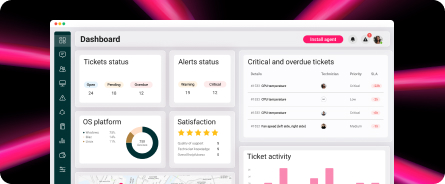
Take a look at our comprehensive dashboard below:

Atera’s all-in-one dashboard (Image via Atera)
As you can see, it is easy to find at-a-glance overviews of all kinds of information – and should you want more detail, just click into a sub-menu to find the advanced analytics and reporting we are famous for.
Now, what about Comodo RMM? Many Capterra users have complained about the platform’s lack of usability in the past, saying, “I have experienced some occasional glitches and slow loading times when using certain features, which can be frustrating.”
For comparison, we did our best to find screenshots of Comodo’s RMM capabilities, but they provide limited images on their website. However, this is what we found:

Comodo’s admin dashboard (via Comodo)
It is worth noting that Comodo has stated that they are undergoing updates with the plan to release a more modern dashboard later in 2025. The jury is still out on how this will stack up.
#4: Pricing and Value for Money
When you’re considering a new product for your IT team, you’ll need to look at the product’s pricing closely to see if it fits within your IT budget. Our team at Atera is committed to transparent pricing. Why? Because we want you to fully understand the value you are getting for your dollar – plus, as you complete due diligence and vet different options, we want to give you the full picture upfront. It makes your life easier, and that is ultimately our goal. Our pay-per-technician pricing structure is unique in the IT software market. Plans for managed service providers (MSPs) start at $129 per month per technician, and the plans for IT departments start at $149 per month per technician.

With Atera, you don’t need to stress about constant upcharges to achieve full functionality. Key integrations like Splashtop and Azure are included in that price. In a Reddit thread, an Atera user mentioned saving $700 on Atera’s Malwarebytes integration:

The same user said, “I’ve not used Comodo, but I recall their billing was nonsensical.”
Unfortunately, Comodo RMM does not share our commitment to transparency and hasn’t listed their prices transparently on their site – you’ll need to reach out to their sales team to get an accurate quote.
Comodo also doesn’t provide information on whether integrations are already included in the standard price. For example, Comodo’s remote access tool works through a third-party tool, and they don’t mention whether it costs extra.
Atera’s pricing plans include integrations with the key remote access tools at no extra cost.
#5: Customer Support and Community
When it comes to support, you can count on Atera to run smoothly and help you solve problems rather than creating them. If you do run into an issue with our product, don’t hesitate to reach out to our live support agents, who are here to help 24/7 and in several different languages. Our customers rave about the reliability and performance of our platform.

Atera’s 24/7 support information
Atera users agree that our sense of community is strong – and we implore each of our users to join our online community, which is nicknamed the “Ateraverse.” It’s an online space that’s great for connecting with other users, troubleshooting common problems, or simply sharing a laugh with fellow IT pros.
Our site is also stocked with countless online resources in case you prefer to solve issues on your own. Discover recorded webinars, a robust knowledge base, and a broad collection of blog posts to broaden your knowledge and get the support you need, no matter when you need it.
What do users think about Comodo customer support and community? Reviewers on trusted sites like All About Cookies and TrustRadius have come to the conclusion that the support pages on the site are confusing and unhelpful. Many also say it was tough to reach live support agents at peak times.
One Capterra user mentioned on Comodo’s support, “Support is slow and doesn’t always seem helpful. A lot of emails instructing you to do the thing you said you already tried. Many of the scripts do not run successfully, causing alerts.”
#6: Security and Compliance
Security and compliance are essential features of any IT management tool– and at Comodo RMM, cybersecurity is pretty much the entire focus of the product. Security-oriented features include malware monitoring, malware remediation, backup, DNS, CDN, web application firewall, and others.
Despite Comodo offering many security-focused features on paper, trusted review sites have raised concerns about their performance. Experts at PC Mag, for example, have noted that while the platform includes advanced capabilities, its complexity can lead to usability issues, including crashes, downtime, and glitches. That’s not what you want from a security provider!
At Atera, we provide an all-in-one solution that is stocked with everything you need for productivity, protection, and beyond. All of our best cybersecurity offerings are included from the get-go – and security is central to everything we do. Plus, you will also get access to our RMM, PSA, and patch management tools without having to invest in even more different products. Comodo might be a well-known security tool – but that doesn’t mean it surpasses Atera in terms of certifications and capabilities! We are proud to share that we have gained numerous accolades in terms of security, including GDPR compliance, AICPA SOC2 compliance, and HIPAA compliance. We also hold numerous ISO certifications.
When you choose Atera for your cybersecurity needs, you can rest assured that we will combat threats with our automated patch management, strict protocols surrounding data privacy, and rigorous adherence to the highest industry standards for compliance.
#7: User Feedback and Reviews
Across the web, Atera has received consistently positive, five-star reviews. That is because our customers recognize us as a reliable and affordable provider of robust IT solutions for MSPs and in-house IT departments alike. With a flexible pricing model that makes growth and scaling easy, our solutions are a great fit for start-up and enterprise customers.
In total, Atera has gathered over 1,200+ reviews across G2 and Capterra, with an average rating of 4.6 out of 5.0 stars. In comparison, Comodo has 100+ reviews with an average rating of 4.1 out of 5.0 stars.
In a Reddit thread that compared Atera and Comodo RMM, users praised Atera’s transparent pricing, features, and the available integrations.
One Reddit user specifically said, ”Happy user of Atera here. They’re constantly releasing new integrations and the pricing on said integrations is excellent. I’ve not used Comodo but I recall their billing was nonsensical.”
In addition, Atera is praised for its AI Copilot, which skyrockets IT team efficiency. One Capterra user appreciates how the AI Copilot helps to analyze tickets, suggest solutions, and respond professionally.

Atera review via Capterra
Now, let’s talk about the reviews for Comodo. Some individual and small business users have found Comodo effective, but many Capterra and Reddit users advice against using the software. One Capterra user said there have been charges for the features that we’re advertised as free.
Wrapping up
As you dive into the world of IT tools to find to figure out the right one to power your organization, you might be considering Atera and Comodo. As you continue your research, you’ll likely discover that Atera offers a much broader range of features, better customer support, and an intuitive user interface that Comodo simply does not match.
Plus, Atera offers a wide range of integrations, which is especially helpful for enterprises that rely on several IT security tools.
Still, we encourage you to research as much as you can before you make a decision. One popular strategy? Consider reaching out to each product’s sales team to receive a demo.
At Atera, you can even enjoy a 30-day free trial with no credit card necessary. Get in touch with us today to experience what Atera is all about.
Frequently Asked Questions
Related Articles

Atera vs. Deel IT: A comparison for IT teams
Find out about the key differences of Atera vs. Deel IT. We’ve compared the two across features, Agentic AI, pricing, support, and interfaces.
Read now
Atera vs. Gorelo: A guide for IT decision makers
See Atera vs. Gorelo compared across key categories, like Agentic AI, features, pricing, user interface, and customer support.
Read now
Atera vs. Rev.io: Full look at the differences for IT teams
See Atera vs. Rev.io compared on pricing, Agentic AI, user interface, and features. Find out which one is the better option for your IT team.
Read now
Atera vs. Tanium: A comparison for IT teams in 2026
See Atera vs. Tanium compared: two autonomous endpoint management contenders. Learn how they differ in AI, platform features, and pricing.
Read nowEndless IT possibilities
Boost your productivity with Atera’s intuitive, centralized all-in-one platform