
Generate summary with AI

Developers are prone to burnout. High workload, inefficient processes, and unclear goals lead to a staggering 83% of software developers suffering. Leaping back and forth across slow and inefficient workflows while struggling through context-switching makes it extremely difficult to focus on the task and create anything efficiently.
What if the traditional way of coding is the problem? In the same way that AI is revolutionizing other industries like IT, content creation, and marketing, it’s starting to make its way into software development as well; called “vibe coding”.
This guide explains everything you need to know about the problems with traditional coding and the way vibe coding tools are simplifying the job.
Why traditional coding creates barriers to innovation
The gap between what development teams need to build and their capacity to build it fast enough is a persisitent problem. Traditional coding environments demand deep technical expertise, create cognitive overload, and leave developers drowning in syntax rather than focusing on solving actual business problems.
The result is a development ecosystem where innovation moves slower than business needs, talented people are excluded from contributing, and developers burn out managing complexity instead of creating value.
More specifically:
Developer problems
For developers themselves, the burden is psychological as much as technical: Context-switching between tasks, wrestling with cryptic error messages, and spending hours debugging syntax issues drain mental energy. Traditional development approaches create cognitive strain that directly impacts developer wellbeing and retention.
“Teams operating under high cognitive load show 25-40% decreased productivity compared to optimised environments, leading to 67% higher developer turnover, 43% longer delivery cycles, and 35% more production incidents. ”
The knowledge transfer problem compounds these challenges. When developers leave or move between projects, their institutional knowledge often leaves with them. Teams lack systematic ways to capture the reasoning behind architectural decisions, forcing new team members through painful, time-consuming onboarding processes.
Accessibility problems
Conventional IDEs like Visual Studio or IntelliJ require years of training to master, which means that non-technical team members with valuable product insights remain locked out of the development process entirely. This creates bottlenecks where great ideas languish in backlog limbo, waiting for developer bandwidth that never materializes.
A less-thought-about problem is the fact that traditional coding excludes the people who understand user needs best. Designers, product managers, and domain experts can articulate what needs to be built and why, but lack the technical skills to build it themselves. This creates a translation layer where requirements get lost, misinterpreted, or deprioritized.
Organizations operating in resource-constrained environments face even steeper barriers. NGOs in Africa struggle to find local developers with specialized skills. Educational institutions in bandwidth-limited regions can’t effectively teach programming using tools that require constant cloud connectivity.
» Discover the ways cloud innovation enhances IT management
What vibe coding tools are (and how they change the game)
Vibe coding tools are intelligent assistants that allow developers (and even non-technical users) to build software by describing what they want in natural language. Unlike traditional IDEs like Visual Studio or IntelliJ, which require manual coding and syntax precision, these tools interpret conversational prompts and generate functional code. Even changes or additions to the code come from conversational prompts. You can edit ans refine the code manually if you wish, but it’s not required.
Their design philosophy centers on augmentation over automation: the technology assists, but doesn’t replace human judgment. Platforms like Cursor and Claude Code embrace a ‘trust-but-verify’ model, where developers remain accountable for quality and security.
The shift represents more than incremental improvement. According to multiple industry studies from MarkTechPost and Nucamp, developers using vibe coding tools complete projects 55% to 75% faster. Context-aware suggestions and automated testing lower bug rates by 30% to 40% in early-stage development.
Core differentiators from traditional development
The fundamental difference lies in the shift from writing code to orchestrating logic. These platforms excel with high-level, expressive languages like Python, JavaScript, and TypeScript. According to Data Science Dojo’s analysis, Python remains the most effective language for vibe coding due to its simplicity and dominance in model training datasets.
The architecture reflects this philosophy. Built on modular, agent-driven architectures powered by large language models and orchestration layers, these systems combine natural language interfaces with backend engines that generate, test, and deploy code.
This enables horizontal scalability, though performance depends on context window limits and usage tokens that vary depending on the tool and subscription plan you’ve chosen. Poor planning and wasted tokens can stop your progress entirely as you wait for your session to refresh.
» Discover the ways that Agentic AI is transforming the workplace
Best vibe coding tools to choose from
The current market offers diverse platforms serving different needs, meaning that there’s an ideal choice for every vibe coding developer.
Best for knowledgable developers: Cursor

Cursor is an AI-powered code editor built for professional developers, enabling rapid project creation and collaborative coding with advanced AI integration. It excels at debugging legacy systems and refactoring large codebases with deep VS Code integration.
Strengths:
- Powerful AI-first code editor designed for deep technical work and structured projects
- Supports detailed instructions, file referencing, and advanced rewrites
- Integrates smoothly with VS Code; access to major AI models (OpenAI, Anthropic)
- Automated code review and PR workflows built-in
Weaknesses:
- Can lag or freeze with large codebases, especially when indexing or editing many files
- More suited for users comfortable with developer environments (less beginner-friendly)
- Doesn’t generate direct UI/app deployments like some competitors
Best for beginners: Lovable

Lovable is a beginner-friendly, web-based vibe coding tool focused on generating complete, responsive web apps from natural language instructions, ideal for fast prototyping without any coding experience. Lovable empowers designers and product managers with visual-first UI building and prompt-based logic.
Strengths:
- Highly beginner-friendly; web-based with straightforward onboarding
- Excels at generating fully functional, responsive web apps
- Includes UI and deployment options for non-coders
- Option to quickly refine and re-generate components
Weaknesses:
- Can produce redundant or cluttered code; requires post-generation clean-up
- Sometimes loses project context, causing inconsistencies or the need for repeated guidance
- Not optimal for complex or highly customized apps that require deep technical adjustments
Best for intermediate developers: Replit

Replit offers a robust online development environment combining manual coding and AI assistance, suitable for users who want to create, test, and deploy applications all within a single browser platform. Replit supports multiplayer coding with integrated hosting, making it ideal for distributed teams.
Strengths:
- Offers a fully-featured online development environment (code, terminal, file management, deployment)
- Creates detailed and creative app structures; suitable for users wanting more control and visibility
- Good balance between AI support and manual coding for advanced users
Weaknesses:
- More complex for non-technical users; not a pure “no-code” solution
- Can be overwhelming due to exposed complexity and requires some development background
- Outputs can feel generic or lack originality if prompts are vague
- Might yield design inconsistencies
Best for reasoning-heavy work: Claude Code

Claude Code is a vibe coding tool powered by Anthropic’s Claude AI, distinguished by its strong reasoning and agentic workflows for code generation, refactoring, and complex debugging tasks through conversational prompts. Claude Code provides enterprise-grade security with sandboxing capabilities.
Strengths:
- Exceptional at reasoning, handling complex refactoring, debugging, and multi-step tasks
- Agentic workflows can orchestrate actions across entire repositories and support in-depth architecture work
- Integrates with Anthropic’s broader Claude platform, enabling chat and long-form reasoning
Weaknesses:
- Short context window can lose project details during long coding sessions, requiring careful session management
- Can get expensive for heavy/extended use, especially with deep agentic tasks across larger codebases
- Terminal-based workflows may have a learning curve; extensions for common IDEs are available
Best for fast prototyping: Bolt-new
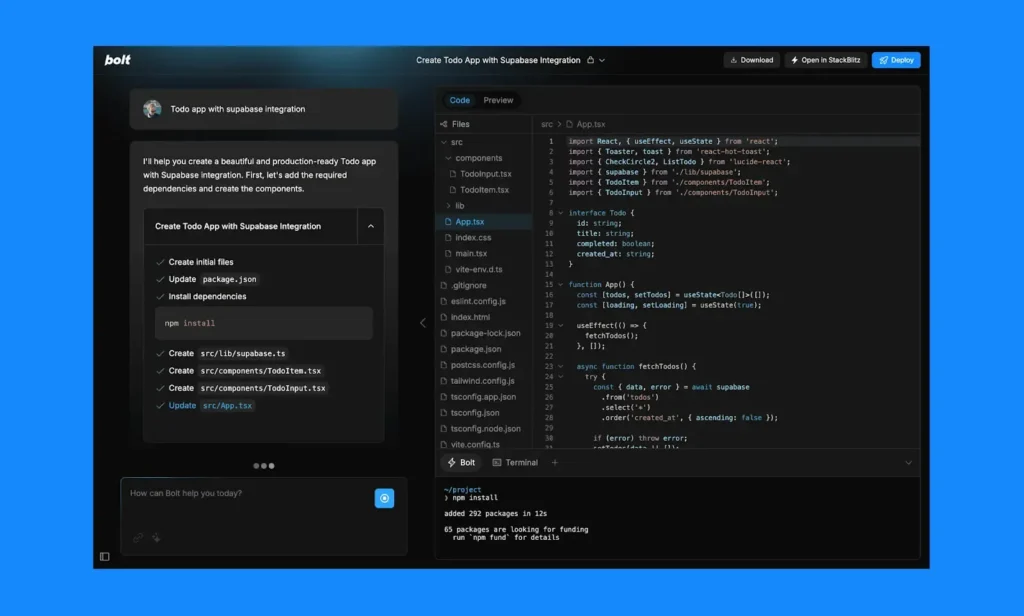
Bolt.new enables ultra-fast creation and deployment of creative browser-based applications through simple prompts, targeting beginners and rapid prototyping scenarios with scalable infrastructure via Bolt Cloud. Bolt.new offers lightweight, fast prototyping with offline mode support.
Strengths:
- Extremely easy to use in-browser, making it ideal for rapid prototyping and deployment
- One of the best at generating visually creative, deploy-ready apps quickly from prompts
- Bolt Cloud solves scaling and backend infrastructure challenges, targeting reliability for serious projects
Weaknesses:
- Like many browser-based tools, not ideal for complex, multi-layer apps or users needing total control
- May face UI/layout alignment issues and deliver results needing cleanup for production use
- Lacks some of the customization and advanced workflows available in developer-centric tools like Cursor or Replit
» Want to stay up to date? Here are the most-creative Agentic AI startups to watch
Implementation workflow and strategic integration
Vibe coding shifts developers from script writers to system architects, focusing on validation, integration, and long-term maintainability. You need a structured approach that balances innovation with control to successfully use vibe coding:
- Project setup: Begin with structured prompts that define context, goals, and constraints. Use established templates from platforms like Lovable to create a solid foundation rather than starting from scratch.
- Prompt engineering: Describe desired functionality in natural language, being specific about requirements and edge cases. The quality of prompts directly impacts the quality of generated code.
- Code generation and refinement: Review and refactor generated code systematically. Apply security checks using integrated validators or external tools like SonarQube and Snyk.
- Testing and debugging: Use integrated test runners and intelligent debugging assistance. Tools like Cursor and Claude Code offer contextual suggestions to improve logic and catch edge cases.
- Deployment: Utilize automated deployment through GitHub Actions, Vercel, or platform-specific hosting. The system handles environment setup and CI/CD pipeline configuration, streamlining what traditionally required extensive manual configuration.
- Documentation and handoff: Save prompts, decisions, and reasoning alongside code. This creates an audit trail and enables knowledge transfer.
Risk mitigation and security considerations
While the productivity benefits are compelling, organizations must address legitimate security concerns. Stanford University researchers found that participants using code assistants wrote significantly less secure code and were more likely to believe their code was secure.
The primary security concern involves pattern replication from public repositories. Without explicit constraints, these tools may reproduce unsafe patterns, potentially introducing SQL injection or XSS vulnerabilities. The models prioritize syntactically correct code over secure design principles.
Here’s what you should implement:
- Static analysis integration: Deploy tools like SonarQube, Snyk, or Checkmarx to scan generated code for vulnerabilities automatically. Modern patch management solutions use similar automated scanning approaches to identify and remediate security issues proactively.
- Prompt engineering standards: Develop and enforce organizational standards for prompt creation, including security requirements and constraint specifications. This standardization ensures a consistent security posture across all generated code.
- Human oversight protocols: Maintain mandatory code review processes, particularly for security-critical components. AI is a great tool, but it can’t replace human oversight entirely.
» Learn more: The Strengthening American Cybersecurity Act and our guide to AI in cybersecurity
Transform your development approach today
It’s clear that the use of AI in development processes will only grow, similar to almost every industry that AI has been introduced to. Vibe coding is a useful tool that enhances the productivity of developers if used well; but it doesn’t have to stop with dedicated software developers.
For example, enterprise IT environments often require their own level of custom code in the form of scripts. Automating maintenance tasks or even solving complex issues across fleets of endpoints can be difficult without the required development knowledge, and vibe coding can bridge the gap.
Technicians using Atera’s AI Copilot can generate powerful scripts from plain-text instructions in seconds. It’s as simple as asking “Write me a script to show all PCs with high CPU usage across my network”, then running the script across your fleet through Atera’s RMM integration.
» Ready to try it out? Try Atera for free
Related Articles

What is IT Management
IT downtime costs thousands of dollars per minute, yet most companies don't realize they have a management problem until systems fail. Without structured IT management, you face productivity hemorrhage, security breaches from unpatched vulnerabilities, and technical debt that consumes IT budgets. Technology should be a business enabler, not a constant crisis.
Read now
What is infrastructure monitoring?
The difference between proactive IT and midnight firefighting comes down to visibility: seeing CPU saturation before it crashes services, catching disk failures before they lose data, and detecting anomalies hours before they become disasters. Effective infrastructure monitoring is the path that gets you there.
Read now
CapEx vs. OpEx
Misclassifying IT spending as CapEx or OpEx inflates profits short-term but distorts financial reporting, tax liability, and strategic decisions. Bad enough, this could be extremely costly and time-consuming to fix. Getting it right determines whether your IT investments align with cash flow, growth trajectory, and compliance requirements.
Read now
How to restart a remote computer using Windows
Remote Windows restarts fail when network connectivity drops, permissions aren't configured correctly, or firewall rules block critical services. This guide covers every method (from Command Prompt and PowerShell to enterprise tools like Intune and SCCM) plus backup strategies for when systems freeze or disconnect from the domain.
Read nowEndless IT possibilities
Boost your productivity with Atera’s intuitive, centralized all-in-one platform













