Generate summary with AI

Microsoft Power Automate is a cloud-based service that empowers users to build workflows and automate tasks. IT, HR, and marketing teams leverage this solution to improve efficiency and speed up processes across operations.
It’s a powerful tool for basic automation—however, some IT organizations seek alternatives for various reasons. Microsoft Power Automate has limited functionality and complicated pricing models compared to other options. Some IT teams may want a solution that focuses entirely on IT automation.
This list compiles the best Power Automate alternatives. It also covers the reasons one might choose another option. You can use this information to find the solution that works best for you.
7 best Power Automate alternatives for IT organizations
Each reviewed option includes an outline of the key features, pros and cons, customer reviews, and pricing.
According to our research, here are the seven best Power Automate alternatives:
Let’s dive into a detailed breakdown of each one.
1. Atera

Atera vs. Power Automate: Key differences
Atera is leading the future of IT with the world’s first Autonomous IT platform, powered by a digital workforce of AI agents. We’re not just offering AI tools; we’re here to change how IT operations and end-user support are managed.
While Power Automate offers broad automation capabilities, it doesn’t extend into a true Agentic AI IT management, like Atera does.
Atera offers all key IT management features, such as RMM software, PSA, helpdesk, scripting, remote access, and Agentic AI technology at the core of it all. In comparison, Power Automate is focused on workflow automation.
Both Atera and Power Automate provide third-party integrations. However, Power Automate customers complain about the lack of integrations outside of Microsoft products.
1. Features and capabilities
At its core, Atera offers the following features:
1. Real-time monitoring to monitor your network health and performance
2. Alerting to notify technicians when issues occur automatically
3. Patch management to keep Windows, Linux, and Mac systems up-to-date
4. AI-powered scripting to create scripts and remediate device issues with ease
5. Ticket management to automatically summarize and respond to tickets
6. Reporting and analytics to create advanced reports and keep track of network health
7. Remote sessions to troubleshoot devices and access summaries highlighting the main points
At the core of this all is Atera’s Agentic AI technology, which represents a paradigm shift in how IT operations are managed.
Atera’s AI agents tackle manual and repetitive tasks fully autonomously, cutting your first response times to zero and freeing up technicians’ time for more strategic tasks.
Atera’s Robin interacts with end-users across channels and resolves tickets, installs/updates pre-approved software, and detects potential issues before they impact your workflow, all without any technician involvement.
With Autopilot handling 80% of your first-tier support, up to 40% of your IT workload is instantly eliminated, while end-users have access to 24/7 support.

Our second AI agent, Atera Copilot, is a highly skilled IT expert that works alongside technicians, expanding their human expertise and capabilities.
Copilot’s capabilities spread across Atera’s platform, and it helps with running health checks, diagnosing issues, spinning up OIDs, generating scripts, summarizing Splashtop sessions, and more.
Together, Atera’s two AI agents create a new way to manage your IT environments, from automated to fully autonomous.
2. User interface and usability
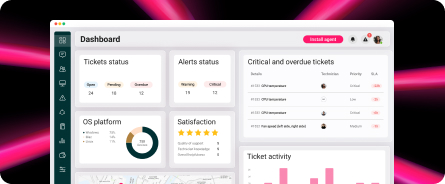
Atera’s intuitive interface makes navigation quick and easy. Users who sign up immediately get access to the admin dashboard, where most tasks can be performed from the left sidebar.

Atera admin dashboard
To access Atera’s AI agents, click on the icon at the bottom-right corner or directly from the alerts, device, or ticket page.

Copilot within ticketing
What’s best, Atera offers 24/7 customer support for all users, so you can always get help if you need it.
Atera also offers various self-help materials. These include a knowledge base, webinars, blog articles, and an active IT community where IT professionals can troubleshoot problems and share the best IT practices.

3. Pricing and value for money
Atera uses a transparent pay-per-technician pricing model, meaning users are charged based on the number of technicians accessing the platform.
While enterprises can request a custom quotation, the pricing plans for IT departments range from $149 to $219/month, and the pricing plans for MSPs range from $129 to $209 per month.
All plans include access to key IT management tools, such as RMM, PSA, remote access, and IT automation. As an add-on, you can access Atera’s AI agents and our network discovery tool.

Here are Atera’s pricing plans laid out:
Atera pricing plans for IT departments:
- Professional: $149 per month, per technician
- Expert: $189 per month, per technician
- Master: $219 per month, per technician
- Enterprise: Custom quotation; contact sales to get pricing
- Pro: $129 per month, per technician
- Growth: $179 per month, per technician
- Power: $209 per month, per technician
- Superpower (Enterprise): Custom quotation; contact sales to get pricing
4. Customer reviews and ratings
Atera’s G2 rating: 4.6 out of 5.0 stars (830+ reviews)
Power Automate G2 rating: 4.5 out of 5.0 stars (400+ reviews)
What Atera users are saying on G2:
- “Atera continues to push the envelope, now incorporating more AI tools to help monitor and maintain the broad spectrum of endpoints,” a G2 user says.
- “Atera AI integrations really help our Level 1 technicians to succeed. The automation of scripts on alerts and Copilot pointing technicians in the right direction makes Atera a cut above the rest,” a G2 user says.
Atera’s Capterra rating: 4.5 out of 5.0 stars (430+ reviews)
Power Automate Capterra rating: 4.4 out of 5.0 stars (180+ reviews)
What Atera users are saying on Capterra:
- “The real-time monitoring feature has been very important in shifting from a reactive mode of managing IT to a proactive one,” a Capterra user says.
- “Incorporating Atera’s AI assistant has brought about a delightful change in automating among my operations,” a Capterra user says.
2. Zapier

Zapier is a popular tool for automating workflows. It works by connecting different apps and services. Users can create custom integrations—no coding abilities required. Zapier has over 7,000+ supported apps, including IT ticketing tools, RMM software, CRM systems, project management platforms, and more.
Because Zapier doesn’t cater solely to IT teams—and because it lacks automation tools for network monitoring, remote access, patching, and IT ticketing—it’s often used alongside more comprehensive IT management tools like Atera.
G2 rating: 4.5 out of 5.0 stars (1,300+ reviews)
Capterra rating: 4.7 out of 5.0 stars (2,700+ reviews)
Zapier pricing:
- Free: Free for basic usage
- Professional: Starts from $29.99 per month
- Team: Starts from $103.50 per month
- Enterprise: Based on custom quotation
3. Kissflow

Kissflow is a Power Automate alternative for enterprise IT teams. Users can easily create and manage workflows without writing a single line of code. The tool can help automate tasks like ticket management, incident management, user onboarding, issue tracking, and real-time alerting.
Kissflow is mainly appreciated for its multipurpose nature. One Capterra user mentions using the software for progress tracking, task assignment, ticketing, and more.
G2 rating: 4.3 out of 5.0 stars (500+ reviews)
Capterra rating: 4.1 out of 5.0 stars (50+ reviews)
Kissflow pricing:
- Basic: Starts at $1500 per month for 50 users
- Enterprise: Based on custom quotation
4. Cflow

Cflow is a workflow automation and project management solution for IT, HR, and marketing teams. One of its core features is automated routing and notifications, which allows users to automatically direct tasks to the right team members and send real-time alerts for approvals, updates, and deadlines.
Cflow also assists with automating asset management, incident management, infrastructure management, and security management. While it can automate basic IT tasks, it lacks the necessary features for automated patch management.
G2 rating: 5.0 out of 5.0 stars (50+ reviews)
Capterra rating: 4.9 out of 5.0 stars (10+ reviews)
Cflow pricing:
- Happy: Starts at $12 per user, per month
- Joy: Starts at $16 per user, per month
- Bliss: Starts at $22 per user, per month
All of the Cflow pricing plans require a minimum of 10 users.
5. SysAid

SysAid is an IT service management platform for MSPs as well as HR and IT teams. It supports automation of tasks such as IT ticketing, user self-service issue resolution, and incident and problem management. Its ticket automation capabilities allow users to automatically categorize, prioritize, and assign tickets to the right technicians.
SysAid’s ITAM tool monitors a user’s network environment automatically and provides real-time alerts when CPU, network equipment, and memory usage changes. Like Atera, SysAid’s IT ticketing system is powered by AI to increase user efficiency.
G2 rating: 4.5 out of 5.0 stars (600+ reviews)
Capterra rating: 4.6 out of 5.0 stars (450+ reviews)
SysAid pricing:
- Based on a custom quotation. Book a demo call with SysAid to receive pricing.
6. ConnectWise Automate

ConnectWise Automate is an RMM software for IT departments and MSPs. It automatically monitors and maintains client networks for any looming issues. Users can automatically deploy patches to Windows, Mac, and Linux devices. Like Atera, ConnectWise Automate has an AI-powered script generator.
Although ConnectWise Automate has received mostly positive reviews, it gets complaints about its integrations. According to a G2 user, it doesn’t integrate well with ticketing solutions, leading to problems with IT teams’ automation workflows. It also doesn’t offer a mobile app.
G2 rating: 4.1 out of 5.0 (120+ reviews)
Capterra rating: 4.1 out of 5.0 (125+ reviews)
ConnectWise Automate pricing:
- Custom quotation: To know ConnectWise Automate pricing, you need to request a quote from their team.
7. Nintex

Nintex is a workflow automation tool that helps IT teams automate tasks such as asset discovery, helpdesk management, incident tracking, and document management. Its drag-and-drop builder allows users to create automated workflows. For increased functionality, Nintex offers third-party app integrations.
Nintex isn’t made for IT departments, so its IT-related automation capabilities are broad at best. Alternative solutions designed for IT organizations—such as Atera—offer more comprehensive abilities.
G2 rating: 4.3 out of 5.0 stars (1,000+ reviews)
Capterra rating: 4.4 out of 5.0 stars (280+ reviews)
Nintex pricing:
- The pricing is based on a custom quotation. To get it, request a demo from Nintex’s website.
The only Agentic AI, Power Automate alternative
Atera’s IT management platform offers more than advanced automation capabilities. It’s powered by Agentic AI through Atera’s AI Copilot and Robin –a solution shown to improve IT technician efficiency tenfold and revolutionize IT management.
Atera’s AI capabilities can create remote session summaries, troubleshoot devices in real-time, generate scripts automatically, write instant ticket summaries, and more.
With the help of Atera’s AI agents, IT organizations can move from reactive to proactive IT management and gain an invaluable competitive advantage.
Interested in learning more? Take the easy first step of signing up for Atera’s 30-day free trial. Or, you can contact our sales team for a custom demo.

Microsoft Power Automate offers a drag-and-drop builder for creating custom workflows, thus enabling users to automate a variety of tasks. These tasks vary widely, from resetting passwords to routing tickets to synchronizing data between IT management tools.
Power Automate has pre-made templates that make it easy to get started. The tool can integrate with other Microsoft products, such as Excel, Sharepoint, Dataverse, and Teams.
Why look for a Power Automate alternative?
Not all IT automation solutions are created equal. We researched Power Automate customer reviews and evaluated the product on our own terms.
We found the solution’s main drawbacks are its complexity, complicated pricing system, and limited functionality.
Let’s look at those customer reviews to learn more.
1. Complex to use
Many reviewers complain about Power Automate’s steep learning curve. According to one G2 user, the solution requires coding abilities for certain functions and is prone to unexpected complications.
For instance: If your workflow is complicated, identifying where it fails can be difficult—Power Automate doesn’t provide much troubleshooting information.
2. Complicated pricing system
Microsoft Power Automate customers complain that because additional fees are charged for extra features, the tool’s costs quickly add up and can become prohibitively expensive.
One G2 user shares that while the tool offers premium and standard connectors, the premium ones come at an extra cost. This is a notable drawback for users needing premium connectors to access third-party tools like Salesforce.
A Capterra user notes that Power Automate only works within the MS Office environment—not in the Windows environment. As a result, IT organizations requiring automation across various systems and platforms beyond Microsoft Office will find the solution difficult to work with.
Last but not least, a Gartner user explains that while the platform offers enough capabilities for their organization, many of the available features contain bugs.
What are Power Automate’s strengths?
Limitations aside, Microsoft Power Automate has a few notable strengths. Those include decent automation capabilities and the ability to integrate with Microsoft products.
Let’s look at some customer reviews to learn more.
1. Automation capabilities
Power Automate can automate various processes on different systems, websites, and desktop apps. A Capterra user mentions that the automation capabilities are easy to use, and include pre-built templates for faster implementation.
2. Integrations with other Microsoft products
Power Automate integrates well with other Microsoft products—a notable advantage for IT teams that rely heavily on the Microsoft ecosystem. According to one Gartner user, the SharePoint and OneDrive integrations are particularly useful.
IT organizations that rely on Windows or other non-Microsoft platforms may find the lack of third-party integrations a deal breaker.
Power Automate pros and cons: Takeaways
In sum, here are Power Automate’s pros and cons:
The pros:
- Good basic automation capabilities
- Integrates well with other Microsoft products
The cons:
- Complex to use and lacks troubleshooting information
- The pricing system is complicated and charges extra for additional features
- The functionality is limited, and some features contain bugs
Frequently Asked Questions
Related Articles

The 7 Best Patch My PC Alternatives in 2026
Discover the best Patch My PC alternatives. Compare them across pricing, features, AI, and user reviews. See which option works best for your organization.
Read now
The 7 Best Rev.io Alternatives Your IT Team Can Use In 2026
Learn about the best Rev.io alternatives that modern IT teams use. See how they compare across features, pricing, user reviews, and AI.
Read now
Top 7 Aisera Alternatives for 2026
Learn about the best Aisera alternatives. See how they differ across features, Agentic AI, pricing, and user reviews.
Read now
7 Best Autotask PSA Alternatives for 2026
Find out the best Datto Autotask PSA alternatives. See how they compare across features, pricing, user reviews, and Agentic AI.
Read nowEndless IT possibilities
Boost your productivity with Atera’s intuitive, centralized all-in-one platform